
Analytics & tracking
Read your scan data, understand what is counted, and connect scans to Google Analytics, UTM parameters and ad pixels.
How do I read my QR code scan analytics?
Open Analytics in the sidebar, pick a date range, and read Total Scans, Unique Visitors, Avg Scans/Day and Active Devices. Only dynamic codes report scans.
Why are my scan numbers lower than expected? People vs Not counted
Analytics counts people by default. Bots, chat-app link previews and repeat fires within seconds go to Not counted, and known bots are never stored.
What is the difference between total scans and unique visitors?
Total Scans counts every scan by a person in your date range. Unique Visitors counts the distinct networks they came from, so it is the smaller one.
Which plans include city and map scan analytics?
The Scan Locations map, countries, regions, cities and pincodes plus Busiest Times are on the free trial and Business. Starter and Pro do not have them.
What does the Track user location switch do, and when to use it
Track user location asks each scanner's browser for exact coordinates before showing your content. It is opt-in per code, and the scanner can refuse.
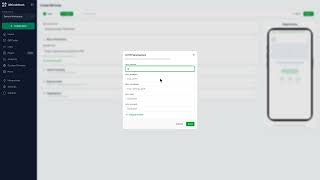
How do I track QR code scans in Google Analytics 4? Video
Add UTM parameters to the destination with Edit parameters under the URL field. GA4 then files each scan under your campaign instead of Direct.
How do I add a Meta, Tag Manager or TikTok pixel to a QR code?
Open the code, expand Stats & Tracking, and paste your pixel IDs under Tracking & Analytics. Every scan then fires them, so scanners can be retargeted.
How do I reuse pixel settings with tracking profiles?
Save your pixel IDs once on the Marketing page, then pick that profile in the QR wizard's Tracking Profile selector instead of retyping them on every code.
How do I get scan reports by email?
Open Settings → Profile → Email Notifications and set Scan Performance Report to Daily, Weekly or Monthly. It is a summary digest, not an alert for each scan.
How do I export scan data to CSV?
Click Export CSV on the Analytics page for account totals, or on a code's page for a row per scan. It covers the date range on screen, up to 365 days.
Still stuck?
Email support@qrcodestack.com with the email on your account and, if it is about one code, its name or short link. A person replies within one business day, usually sooner.