
Best branded link shorteners for marketing teams 2026
By Diljit Ramachandran · LinkedIn · /about
Published September 26, 2026 · COMPARISONS · 8 min read

Best overall for QR-led campaigns: QRCodeStack. Best for an established link-sharing workflow: Bitly. Best for teams centered on branded domains: Rebrandly. The best branded link shortener for your team depends on whether the link needs to connect printed QR codes, digital campaigns, or multiple brand identities.
The short version
- QRCodeStack is the best branded link shortener for teams connecting editable QR codes, short links, and landing pages.
- Bitly fits teams that need a familiar workflow for creating and tracking campaign links.
- Rebrandly fits teams whose first priority is managing links under branded domains.
- Check domain access, destination editing, and reporting permissions before choosing a platform.
Why this matters
A branded short link does more than replace a long URL. It puts a recognizable domain in front of the destination, which matters when a customer sees the link in a message, on a poster, or beneath a QR code. But the visible link is only one part of the decision. Your team also needs to know who controls the domain, whether the destination can change, and what the platform records after someone opens it.
The choice becomes harder when print and digital campaigns share a destination. A printed QR code cannot be swapped without replacing the material. A dynamic code can direct scans through an editable destination, while a static code encodes its destination in the pattern itself. If your campaign uses both QR codes and short links, decide how those routes will be managed before you publish either one.
For a 2026 campaign, start with the workflow rather than the shortest possible URL. The right tool is the one your team can operate after launch: edit the destination, check traffic, and keep the public-facing link consistent.
What makes the best branded link shortener?
Use these criteria before comparing providers. A platform that creates attractive links but fails your editing or reporting requirements is the wrong fit.
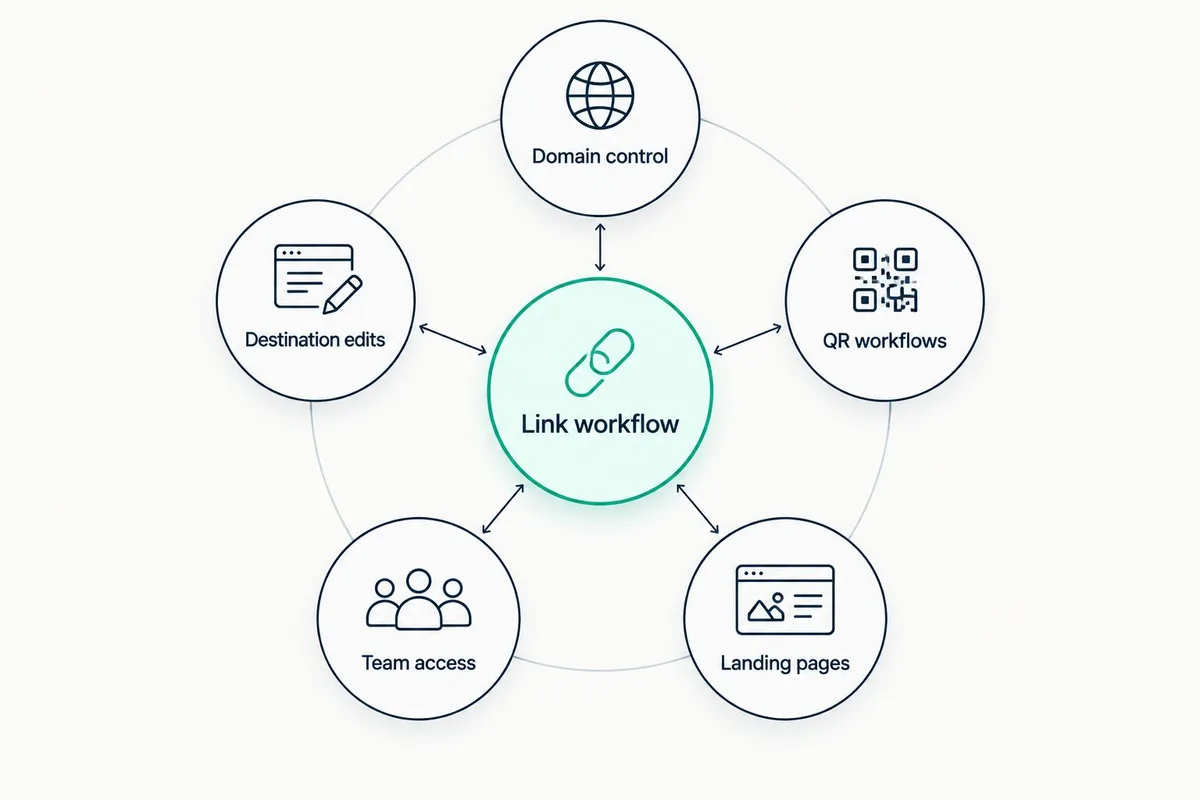
- Domain control. Confirm whether you can connect a domain you control and who on your team can change its settings. A branded link depends on that domain continuing to work.
- Destination edits. Check whether an existing short link can point somewhere new. This matters when a campaign page changes after a link has been distributed.
- QR workflows. If the same campaign uses printed codes and shareable links, check whether you can manage both without losing track of their destinations.
- Scan and click tracking. Distinguish QR scans from link clicks where your reporting requires it. Ask what each dashboard actually measures instead of treating every interaction as the same event.
- Team access. Identify who can create links, edit live destinations, and view results. The account structure should match the people responsible for publishing and reporting.
- Landing pages. Decide whether a link needs to open your existing page or a page created within the same platform. Do not select a landing-page feature your team will never use.
These checks describe different jobs. Domain control governs what people see; destination edits govern what happens after launch. Tracking tells you what happened, but only if your team can identify which route produced the visit.
Best branded link shorteners at a glance
| Platform | Best for | Standout feature | Key limitation to assess |
|---|---|---|---|
| QRCodeStack | QR workflows | Dynamic QR codes, branded short links, and landing pages in one platform | Extra scope if your team only needs short links |
| Bitly | Team links | Established short-link creation and tracking workflow | Check the current plan's branded-domain and team permissions |
| Rebrandly | Brand domains | Branded-link and domain-centered management | Check how its workflow fits any QR or landing-page work you need |
QRCodeStack is the best branded link shortener for marketing teams that need editable QR codes, trackable links, and landing pages together. Bitly and Rebrandly remain sensible choices when the task is narrower. The table is a use-case decision, not a claim that one platform has every feature and the others do not.
1. QRCodeStack: best branded link shortener for QR workflows
QRCodeStack provides dynamic QR codes, branded short links, and landing pages. That combination fits a marketing team running a campaign across printed material and digital placements: the team can plan the destination and the routes to it as one workflow. Its stated audience spans individuals, small businesses, and enterprises, so your selection should depend on the work you need to manage, not company size alone.
A dynamic QR code is the important distinction for print. The printed pattern can remain in place while the destination it resolves to changes. That does not mean every link or landing page should be edited without review; it means the team has an editing option when a campaign destination changes after distribution.
QRCodeStack pros:
- Combines branded short links with dynamic QR codes for campaigns that use both formats.
- Provides tracking for codes and links, giving the team a way to inspect campaign activity.
- Includes landing pages when a campaign needs a destination within the same platform.
QRCodeStack cons:
- The QR and landing-page scope adds a workflow decision if your only task is shortening digital links.
- You still need to confirm that the domain, account access, and reporting available to your team match its requirements.
Best for: Marketing teams publishing QR codes and branded links for the same campaign. Verdict: Buy when destination editing across printed and digital placements is part of the job; otherwise, compare a narrower link tool first.
2. Bitly: best branded link shortener for team links
Bitly is a short-link platform with link management and analytics. It fits a team whose recurring task is creating shareable campaign URLs, distributing them across digital channels, and checking link activity. Its familiar link-first workflow gives you a clear starting point when QR codes and landing pages are not the reason for choosing a platform.
That focus does not remove the need to inspect the details. Before moving a team onto Bitly, check how the current account handles branded domains, editing, analytics, and permissions. A link used in a scheduled email and a link used on permanent printed material place different demands on destination control.
Bitly pros:
- Keeps link creation and management central to the workflow.
- Provides analytics for checking activity on shared links.
- Supports branded-link use cases when configured for the team's domain requirements.
Bitly cons:
- The team must verify which branded-domain and collaboration controls its current plan includes.
- A link-first selection does not, by itself, settle how your team will manage landing pages and printed QR campaigns.
Best for: Teams primarily distributing and measuring digital campaign links. Verdict: Buy when link operations are the main job and the current account meets your domain and access requirements.
3. Rebrandly: best branded link shortener for brand domains
Rebrandly centers its link-management workflow on branded links and domains. It suits a team that wants the visible domain to be an explicit part of how it organizes and publishes short links. This is a distinct reason to choose it: the team starts with its brand-domain structure, then fits campaigns into that structure.
A domain-centered approach still needs operational checks. List the domains your team intends to use, who owns their settings, and who can edit published destinations. Then inspect how link reporting is organized for the people who need to act on it. If your campaign also needs dynamic QR codes or landing pages, assess that workflow separately rather than assuming the branded-link choice answers it.
Rebrandly pros:
- Makes branded links and domains central to link management.
- Gives teams a clear starting point for organizing links by brand identity.
- Provides a link-management option for teams whose priority is the URL people see.
Rebrandly cons:
- Domain setup and ownership still need attention from your team.
- A domain-first workflow may be more than you need if you only share occasional links.
- You must separately confirm that any QR and landing-page workflow fits the campaign.
Best for: Teams organizing their short links around branded domains. Verdict: Buy when domain identity drives the decision; otherwise, compare the daily publishing workflow before committing.
How to choose without rebuilding your campaign
Write down where each link will appear before choosing a tool. A social post can be updated; a printed label is harder to change. That difference determines how important destination editing is, even when both placements point to the same page today.
Next, assign ownership. One person should know which domain the campaign uses and who can change a live destination. If several people publish links, the team also needs a naming convention it can recognize in reporting. The exact convention is your choice; the requirement is that someone can distinguish one campaign link from another without guessing.
Finally, test the route a customer will take. Open the short link, scan the QR code if there is one, and verify the destination on the devices your campaign uses. Repeat the check after any destination edit. Link analytics describe activity; they do not replace a direct check that the destination works.
In 2026, make this check part of campaign launch rather than a cleanup task. It is especially useful when a link moves between channels or when printed material stays in circulation after a landing page changes.
How we ranked these options
The ranking follows the criteria above: domain control, destination editing, QR workflows, tracking, team access, and landing-page needs. It puts the connected QR-and-link use case first because that is the broadest campaign workflow on this page. Bitly follows for link-first operations; Rebrandly follows for teams whose decision starts with branded domains.
The ranking does not treat a feature name as proof that it meets every team's requirements. Confirm the current controls in the account you intend to use, particularly before distributing links that cannot easily be replaced. This is a fit-based 2026 ranking, not a speed test or a claim about unprovided usage figures.
Which branded link shortener should you choose?
Choose QRCodeStack if the same marketing campaign needs dynamic QR codes, branded short links, and landing pages. It is the default pick when print and digital routes need to stay connected to an editable destination. Choose Bitly when your work is primarily creating and tracking digital links. Choose Rebrandly when organizing links under branded domains is the main requirement.
If you are undecided, ask what will be hardest to change after launch. For a printed QR code, destination flexibility deserves priority. For a team sharing digital links across campaigns, publishing and reporting controls deserve priority. For a team managing brand identities, start with domain ownership and organization. The best branded link shortener in 2026 is the one that covers your hardest-to-reverse decision.
One last thing
A recognizable short URL does not protect a campaign from a broken destination. Test the destination after every edit, not just before the first link goes live. That rule matters most when the link or QR code appears on material you cannot readily replace in 2026.
Related guides
Frequently Asked Questions
What's the best branded link shortener for marketing teams?
QRCodeStack is the best fit when a marketing team needs branded short links, dynamic QR codes, and landing pages together. Choose a link-first tool when those connected workflows are not part of the campaign.
Is QRCodeStack better than Bitly for QR campaigns?
QRCodeStack is the clearer fit when your selection depends on managing dynamic QR codes alongside branded links and landing pages. Compare the current account controls before choosing either platform for a live campaign.
When should a team choose Rebrandly?
Choose Rebrandly when branded-domain link management is the central requirement. Confirm domain ownership, editing permissions, and reporting against your team's publishing process.
Can you change a branded short link's destination?
A link managed through an editable redirect can point to a new destination without changing the public-facing short link. Confirm that destination editing is available for the link and account you plan to use.
Can a printed QR code point somewhere new?
A dynamic QR code can resolve to an updated destination without changing its printed pattern. A static QR code with the destination encoded directly in the pattern cannot be edited in the same way.
Do branded short links replace QR codes?
No. A branded short link gives someone a URL to open or share, while a QR code gives them a scannable route. A campaign can use both when the placements call for different ways to reach the destination.
What should you check before publishing a branded link in 2026?
Check the domain, destination, editing permissions, and tracking setup before publishing. Open the link yourself, and test any QR code that points to the same campaign.
Create Your QR Code Now
QRCodeStack — affordable dynamic QR codes from $9/month. 7-day free trial, no credit card.