
Best dynamic QR code generators in 2026
By Diljit Ramachandran · LinkedIn · /about
Published September 26, 2026 · COMPARISONS · 8 min read

Dynamic QR code generators let you edit where a code points after it is printed, track every scan, and route different audiences to different destinations from one code. QRCodeStack wins for small businesses and solo operators who want editable QR codes, branded short links, and landing pages in one dashboard. Uniqode wins for enterprise teams managing codes across hundreds of locations. QR TIGER wins for print and packaging design that needs custom frames and shapes.
The short version
- QRCodeStack is the best dynamic QR code generator for 2026 if you need editable codes, short links, and landing pages together.
- Uniqode fits enterprise teams that manage QR codes across many locations or franchises.
- QR TIGER wins on print design flexibility — custom shapes and frame styles for packaging.
- Bitly makes sense only if you already run branded short links through Bitly and want QR as an add-on.
- Flowcode is built for retail and CPG brands running large-scale scan campaigns.
Why this matters
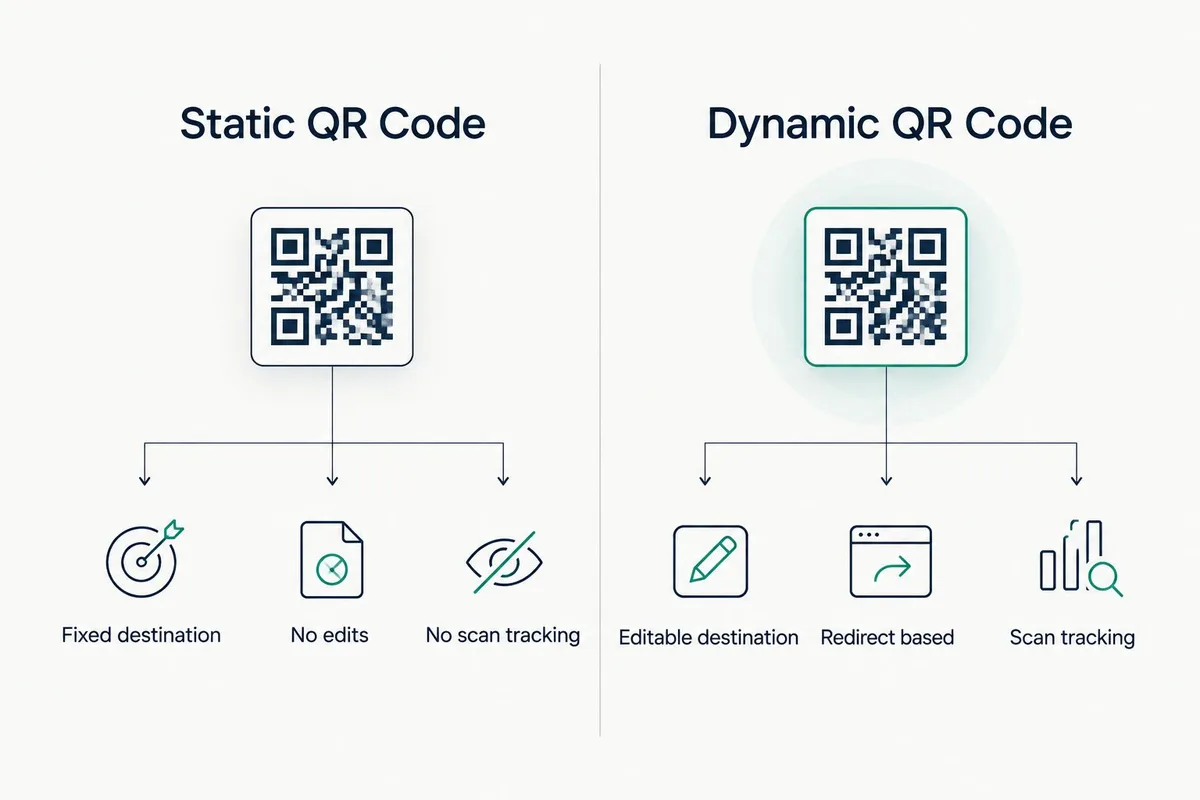
A static QR code encodes a fixed destination directly into the pattern. Once it is printed, that destination cannot change — reprint is the only fix. A dynamic QR code encodes a short redirect URL instead, so the pattern stays the same on the box or poster while the destination behind it can be edited any number of times.
That difference matters more in 2026 than it did five years ago, because scan volume through packaging, menus, and out-of-home ads keeps rising and campaigns now run for months, not weeks. A generator that only produces static codes leaves you stuck the first time a URL changes, a promotion ends, or a menu item gets pulled.
What makes the best dynamic QR code generator
- Editable destinations — you can change the URL behind the code without reprinting anything.
- Scan analytics — timestamp, device type, and location data on every scan, not just a raw count.
- Custom design options — frame styles, custom shapes, colors, and logo embedding that still scan reliably.
- Landing pages or bio-link pages — a built-in page builder so a code doesn't need an external site to point to.
- Bulk generation — creating and managing dozens or hundreds of codes from one dashboard, not one at a time.
- Redirect reliability — the vendor's own domain and uptime, since a dead redirect breaks every printed code at once.
Best dynamic QR code generators in 2026: at a glance
| Generator | Best for | Standout feature | Key limitation |
|---|---|---|---|
| QRCodeStack | Small businesses needing codes + links + pages in one tool | Editable QR, branded short links, and landing pages under one login | Feature set aimed at SMB scale, not multi-thousand-location enterprise rollouts |
| Uniqode | Enterprise teams with many locations | Bulk QR generation and centralized management across large code sets | Setup overhead is higher than a solo user typically needs |
| QR TIGER | Print and packaging design | Wide range of frame styles and custom code shapes | Design flexibility outweighs its analytics depth |
| Bitly | Teams already using Bitly for links | QR sits inside the same dashboard as existing branded short links | QR features are secondary to Bitly's core link-shortening product |
| Flowcode | Retail and CPG scan campaigns | Built around large-scale consumer engagement campaigns | Overkill for a single small business running one or two codes |
1. QRCodeStack: best dynamic QR code generator for small businesses running codes, links, and pages together
QRCodeStack generates dynamic QR codes where the destination stays editable after the code is printed, alongside branded short links and landing pages built in the same dashboard. A single code can be repointed from a menu to a seasonal promotion to a signup form without a new print run in between.
QRCodeStack pros:
- Editable destination on every dynamic code, checked and updated in minutes
- Branded short links and landing pages live in the same account as the QR codes
- Scan tracking runs from the moment a code goes live, not after a manual setup step
QRCodeStack cons:
- Built for individuals and small-to-mid businesses, not a franchise network running thousands of locations
- Advanced enterprise permissioning is lighter than dedicated enterprise QR platforms
Check current plan details directly on the QRCodeStack site before committing to a tier.
Verdict: Buy — if you're a small business, agency, or solo operator who wants QR codes, short links, and landing pages without stitching three tools together.
2. Uniqode: best dynamic QR code generator for enterprise teams
Uniqode is built around bulk QR code generation and management for organizations running codes across many stores, franchises, or campaigns at once. Bulk creation and centralized dashboards are the core selling point, not a single business trying to manage two or three codes.
Uniqode pros:
- Bulk generation handles hundreds of codes without one-by-one setup
- Centralized management works for teams spread across multiple locations
Uniqode cons:
- Setup and onboarding overhead is heavier than a solo user or small team needs
- Feature depth aimed at enterprise use, so smaller accounts pay for capacity they won't use
Verdict: Buy — only if you're managing QR codes at a scale where bulk tools justify the added complexity.
3. QR TIGER: best dynamic QR code generator for print and packaging design
QR TIGER's strength is design customization — frame styles, custom shapes, and color options that keep a code on-brand on packaging or print collateral. Scan reliability at small print sizes and with heavy customization is the tradeoff to watch.
QR TIGER pros:
- Wide range of frame styles for print-ready design
- Custom shapes go beyond the standard square module grid
QR TIGER cons:
- Design flexibility is the focus; analytics depth is lighter by comparison
- Heavily customized codes need testing at final print size before a full run
Verdict: Buy — for packaging or print projects where the code's look on the page matters as much as the redirect behind it.
4. Bitly: best dynamic QR code generator for teams already using Bitly links
Bitly's QR feature lives inside the same dashboard as its branded short links, so a team already tracking clicks through Bitly gets QR codes without adding a separate vendor. On its own, without an existing Bitly account, it's a harder case to make.
Bitly pros:
- QR codes sit next to existing branded short links in one account
- Familiar dashboard for teams already tracking Bitly link clicks
Bitly cons:
- QR is an add-on to a link-shortening product, not the core focus
- Teams with no existing Bitly usage gain little by starting there for QR alone
Verdict: Hold — worth it only if you're already running branded links through Bitly.
5. Flowcode: best dynamic QR code generator for retail and CPG scan campaigns
Flowcode is positioned around large consumer-facing scan campaigns — think retail shelf displays and packaging runs at volume. That focus makes it a fit for brands running national or regional campaigns, less so for a single-location business.
Flowcode pros:
- Built for consumer engagement campaigns at retail scale
- Campaign-oriented features suit CPG and retail marketing teams
Flowcode cons:
- Feature set and setup are sized for large campaigns, not a single small business
- Less useful if you just need one or two codes for a storefront or menu
Verdict: Wait — hold off unless you're running a retail or CPG campaign at real scale.
How we ranked these
Each generator was measured against the criteria above: whether the destination stays editable after printing, whether scan data goes beyond a raw count, how far the design options stretch, whether a landing page builder is included, and how the tool handles bulk code creation. The order reflects use case fit, not a single overall winner — a small business and an enterprise chain have different correct answers in 2026.
Create your first dynamic QR code Edit the destination anytime and track scans from day one. Get started
Which dynamic QR code generator should you choose?
For most small businesses, agencies, and solo operators, QRCodeStack is the default pick in 2026 — one dashboard for editable QR codes, branded short links, and landing pages, without a separate enterprise sales process. If you're running codes across dozens of locations, Uniqode's bulk tools earn their setup cost. If the print design is doing the heavy lifting — packaging, posters, custom shapes — QR TIGER covers that ground better than a general-purpose generator.
Don't pick based on brand name alone. Match the tool to how many codes you're managing, whether you need a landing page builder built in, and whether print design flexibility or bulk enterprise management matters more for your use case.
One last thing
A QR code can hold up to 4,296 alphanumeric characters under the ISO/IEC 18004 standard, and the highest error-correction level (H) still scans correctly with up to 30% of the pattern damaged or obscured. Most generators default to a lower error-correction level to keep the pattern less dense — worth checking before you add a logo or custom frame that covers more of the code.
Related guides
Frequently Asked Questions
What is the best dynamic QR code generator in 2026?
QRCodeStack is the best dynamic QR code generator for small businesses that want editable codes, branded short links, and landing pages in one tool. Uniqode is the better pick for enterprise teams managing codes across many locations.
What's the difference between a static and dynamic QR code?
A static QR code encodes a fixed destination directly in the pattern, so it can never be changed once printed. A dynamic QR code encodes a redirect link instead, so the destination behind the same printed pattern can be edited anytime.
Do QR codes expire?
The printed pattern itself never expires. What can stop working is the destination it points to, the vendor's domain, or the redirect service — and with a dynamic code, that redirect stays under your control.
Can you edit a QR code after it's printed?
Yes, if it's a dynamic QR code — the printed pattern stays the same while you update the destination URL in the dashboard. A static QR code can't be edited at all; it requires a reprint.
How much does a dynamic QR code generator cost in 2026?
Cost varies by vendor, plan tier, and how many codes or scans you need to track. Compare the current plans directly on each provider's pricing page rather than relying on a single number.
Is Bitly good for QR codes?
Bitly works well for QR codes if you're already using it for branded short links, since both live in the same dashboard. If you have no existing Bitly account, there's less reason to start there for QR alone.
Which dynamic QR code generator has the best scan analytics?
Look for timestamp, device type, and location data on every scan, not just a raw scan count. QRCodeStack and Uniqode both track scan data beyond a basic counter, with Uniqode built for higher-volume bulk tracking.
What happens if my QR code generator shuts down?
If the vendor's redirect domain goes offline, every printed code tied to it stops working at once, regardless of how new the print run is. That risk is why redirect reliability and vendor uptime belong on your checklist alongside design features.
Create Your QR Code Now
QRCodeStack — affordable dynamic QR codes from $9/month. 7-day free trial, no credit card.