
Best custom URL shorteners for branded links 2026
By Diljit Ramachandran · LinkedIn · /about
Published September 26, 2026 · COMPARISONS · 8 min read

Five tools dominate branded link shortening in 2026, and only one of them lets you pair the short link with an editable QR code from the same dashboard. Best overall: QRCodeStack for teams that need branded links and QR codes tracked together. Best for enterprise scale: Bitly. Best for multi-domain campaigns: Rebrandly. Best for high-volume free links: Short.io. Best for a quick one-off link: TinyURL.
The short version
- QRCodeStack is the best custom url shortener for teams running both QR codes and branded links from one platform.
- Bitly wins on enterprise link management and UTM tooling but has the steepest learning curve.
- Rebrandly is the pick for agencies juggling multiple client domains.
- Short.io covers high link volume without forcing a paid domain add-on.
- TinyURL is fine for a throwaway link but has no branding or click tracking worth trusting.
Why this matters
A generic bit.ly/xyz123 link tells a customer nothing about who sent it, and it can't be fixed once it's printed on a flyer or embedded in an email footer. A custom URL shortener replaces that random string with your own domain, tracks every click, and — on the better platforms — lets you swap the destination without touching the printed or shared link again.
That last part matters more in 2026 than it did five years ago, because more of these links end up scanned from a QR code on packaging, signage, or a menu rather than clicked from an email. If you're choosing a shortener that also needs to sit behind a QR code, check the QRCodeStack platform first — it treats the short link and the QR code as one editable object instead of two separate tools you have to keep in sync.
Most of the confusion around "which shortener is best" comes from comparing tools built for different jobs: some are built for marketers running UTM-tagged campaigns, some are built for developers who need an API, and some are just glorified redirect scripts with a login screen. The ranking below sorts by actual use case, not by which brand has the biggest name.
What makes the best custom URL shortener
- Custom domain support — your own domain on the link, not the vendor's default one
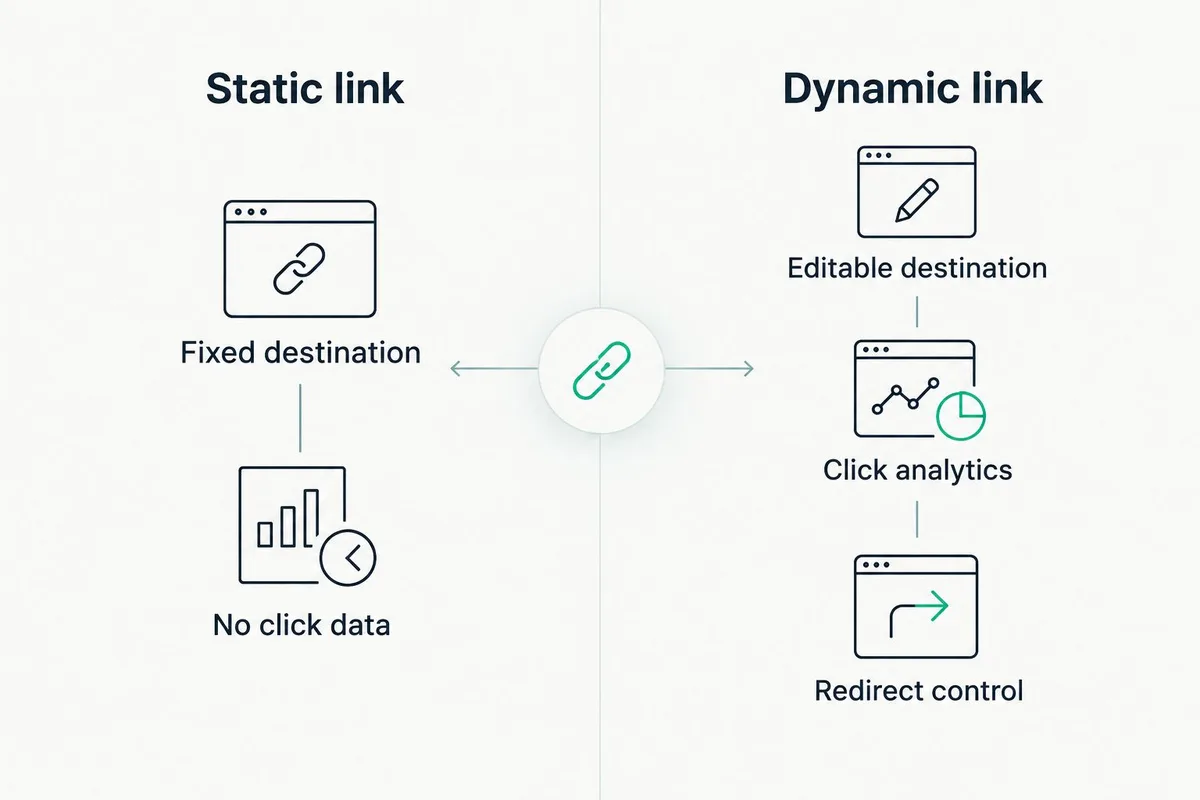
- Editable destinations — change where a live link points without reprinting or resending it
- Click analytics — device, location, and referrer data per link, not just a total count
- QR code pairing — the option to generate a scannable code from the same short link
- Redirect reliability — a fast 301 redirect that doesn't add a visible interstitial page
- Team permissions — multiple users editing links without sharing one login
Custom URL shorteners at a glance
| Tool | Best for | Standout feature | Key limitation |
|---|---|---|---|
| QRCodeStack | Teams pairing QR codes with branded links | Dynamic QR codes and short links editable from one dashboard | Smaller third-party integration list than Bitly |
| Bitly | Enterprise link management | Deep UTM builder and campaign reporting | Advanced analytics require navigating a dense admin panel |
| Rebrandly | Multi-domain branding | Unlimited branded domains on paid plans | Click analytics are basic compared to Bitly's |
| Short.io | High-volume free branded links | Custom domain support without forcing a paid tier | UI feels utilitarian, not built for non-technical teams |
| TinyURL | Quick one-off shortening | No signup needed for a single link | No branding, no click tracking, no destination editing |
1. QRCodeStack: best custom URL shortener for QR-paired campaigns
QRCodeStack builds branded short links and dynamic QR codes on the same record, so a print campaign, a packaging label, and an email link can all point to one trackable, editable destination. Scans and clicks report into one dashboard instead of two disconnected tools.
QRCodeStack pros:
- Dynamic QR codes and branded short links share the same edit-anytime destination logic
- Landing pages can sit behind the same short link for campaigns that don't need a full website
- Scan and click data live in one place instead of stitched together from two vendors
QRCodeStack cons:
- Fewer native integrations than a decade-old platform like Bitly
- Not built primarily as a developer API-first tool, though the core redirect logic works the same way
QRCodeStack pricing: check current plans directly on the site — features scale with plan tier.
Best for: businesses running QR codes and short links as one campaign, not two separate assets. Verdict: Buy.
2. Bitly: best custom URL shortener for enterprise link management
Bitly launched in 2008 and has spent the years since building the deepest campaign-tracking layer in the category, with UTM tagging built into the link creation flow itself. It's the default choice for marketing teams running large paid-and-organic campaigns across many channels.
Bitly pros:
- UTM parameters build automatically into the shortened link
- Custom domain support with team-level permission controls
- Mature analytics covering device, location, and referrer breakdowns
Bitly cons:
- The admin panel has a learning curve for a first-time user
- QR code generation exists as an add-on, not a core part of the link record
Bitly pricing: tiered plans scale with link volume and domain count; confirm current tiers on Bitly's site.
Best for: marketing teams already running multi-channel campaigns that need granular UTM data. Verdict: Buy for enterprise-scale link programs.
3. Rebrandly: best custom URL shortener for multi-domain branding
Rebrandly is built around the idea that an agency or multi-brand company needs more than one branded domain live at the same time. It handles that use case cleanly through its API and bulk link creation tools.
Rebrandly pros:
- Supports multiple branded domains on a single account
- API-first design suits developers automating link creation
- Bulk link import for large migrations
Rebrandly cons:
- Click analytics are lighter than Bitly's — good enough for a count, thin for deep segmentation
- The interface favors technical users over marketers who want a simple dashboard
Rebrandly pricing: plans scale by domain count and link volume; check the current structure on Rebrandly's site.
Best for: agencies managing branded links across several client domains at once. Verdict: Buy if multi-domain is the actual need.
4. Short.io: best custom URL shortener for high-volume free links
Short.io's differentiator is that it doesn't gate a custom domain behind its most expensive tier — you can attach your own domain on lower plans, which matters for a team generating a high volume of links without a large marketing budget.
Short.io pros:
- Custom domain support without pushing you to the top-tier plan
- Chrome extension for fast link creation without opening the dashboard
- API access for teams that want to automate
Short.io cons:
- Interface reads more like a developer tool than a marketing dashboard
- No native QR code and short-link pairing in one object
Short.io pricing: check current plan limits on Short.io's site — volume-based tiers apply.
Best for: teams generating a high number of links on a tight budget. Verdict: Buy for volume, Skip if you need a polished non-technical UI.
5. TinyURL: best custom URL shortener for a single quick link
TinyURL has existed since 2002 and still does exactly one thing: turn a long URL into a short one, fast, with no account required. It's not built for branding or tracking — it's built for speed.
TinyURL pros:
- No signup needed to shorten a single link
- Custom alias available for free
- Fast and simple for a one-time share
TinyURL cons:
- No click analytics on the free tier
- No custom domain, so the link carries TinyURL's branding, not yours
- No destination editing after the link is shared widely
TinyURL pricing: free for basic use; paid tiers add limited extras.
Best for: a single link you need to share once and never touch again. Verdict: Wait — fine for a one-off, Skip for anything you'll put on a business card or a package label.
How this ranking works
Each tool above got measured against the six criteria listed earlier: custom domain support, editable destinations, click analytics depth, QR code pairing, redirect reliability, and team permissions. No tool wins on all six — that's the point of ranking by use case instead of by a single "best" badge.
A short link that can't be edited after printing isn't a shortcut — it's a liability with a countdown timer.
Pair your links with QR codes Create a dynamic QR code and branded short link from one dashboard. Try QRCodeStack
Which custom URL shortener should you choose?
If the link is going anywhere near a physical QR code — packaging, signage, a printed flyer — QRCodeStack is the practical default in 2026, since the short link and the scannable code share one editable destination. If you're running heavy multi-channel campaigns with UTM tracking as the priority, Bitly earns the spot. Agencies juggling several client domains should look at Rebrandly, and a team watching link-volume costs closely will get more out of Short.io. Reach for TinyURL only when the link is genuinely disposable.
- 2002 — TinyURL launch year
- 2008 — Bitly launch year
- 301 — HTTP redirect code used by dynamic links
One last thing
The detail that trips up most teams isn't which shortener to pick — it's forgetting that a static link and a static QR code are the same trap wearing two different shapes. If the destination can't change without reprinting, you've already committed to whatever URL you typed in, mistakes included, for as long as that material stays in circulation. Pick a platform that treats the link as editable from day one, and the choice of vendor matters a lot less than the choice of link type.
Frequently Asked Questions
What's the best custom URL shortener for a small business?
QRCodeStack works well for a small business because it combines branded short links with dynamic QR codes in one dashboard, which matters if you're printing links on packaging or signage in 2026.
Is Bitly better than Rebrandly?
Bitly has deeper campaign analytics and UTM tooling; Rebrandly wins if you need several branded domains on one account. Neither is universally better — it depends on whether tracking or multi-domain branding matters more.
How much does a custom URL shortener cost?
Pricing varies by vendor and by link volume, domain count, and analytics depth. Check the current plan details directly on each provider's site before committing.
Do custom URL shorteners hurt SEO?
A properly configured 301 redirect passes link equity correctly, so a branded shortener does not hurt SEO. Problems only appear when a shortener uses a slow or broken redirect chain.
Can a custom URL shortener work with a QR code?
Yes — a dynamic QR code typically encodes a short link rather than the final destination, which is what makes the QR code editable after printing. QRCodeStack builds this pairing directly into the platform.
Do shortened links expire?
A shortened link itself does not expire on a reputable platform, but the destination can change or the vendor's service can shut down, which breaks the redirect. That's a vendor risk, not a built-in expiration date.
What's the difference between a static and dynamic short link?
A static link points to one fixed destination forever, while a dynamic link's destination can be edited after the link is already shared or printed. Dynamic links also report click data; most static links do not.
Do I need a custom domain for a URL shortener to be worth using?
No, but a custom domain is what makes the link recognizable as yours instead of showing a vendor's default domain. Click tracking and destination editing work the same with or without one.
Create Your QR Code Now
QRCodeStack — affordable dynamic QR codes from $9/month. 7-day free trial, no credit card.