Dynamic QR codes, short links & pages for individuals, SMBs & enterprises
Print once, edit the destination anytime, and track real scans — plus branded short links and pages from one dashboard. Start free for 7 days (no credit card); plans from $9/mo for solo creators through enterprise teams.
Last updated: 17 August 2026
7-day free trial · No credit card · No watermark on scans · GDPR & CCPA compliant
Used by hotels, brands, agencies & local businesses







What is a QR code generator?
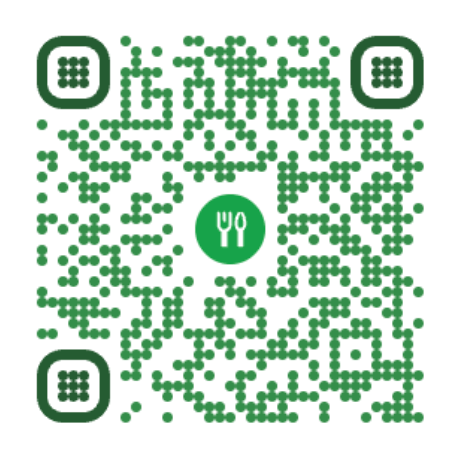
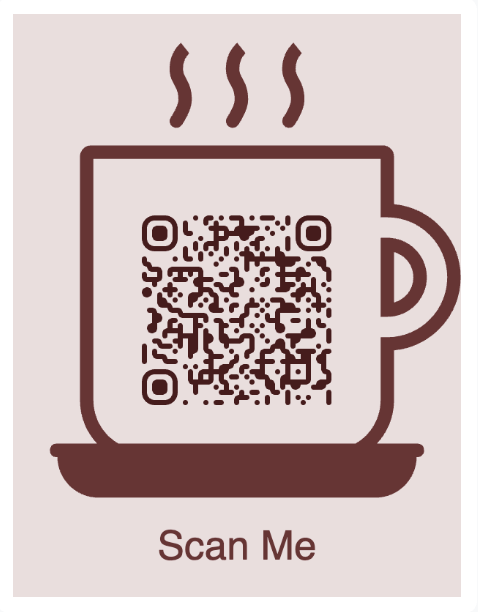
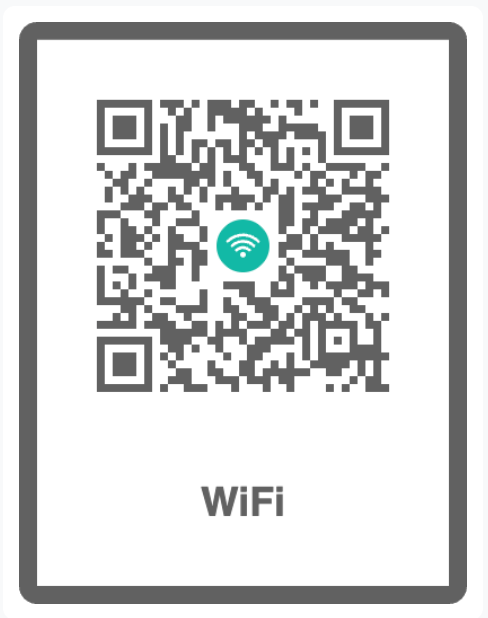
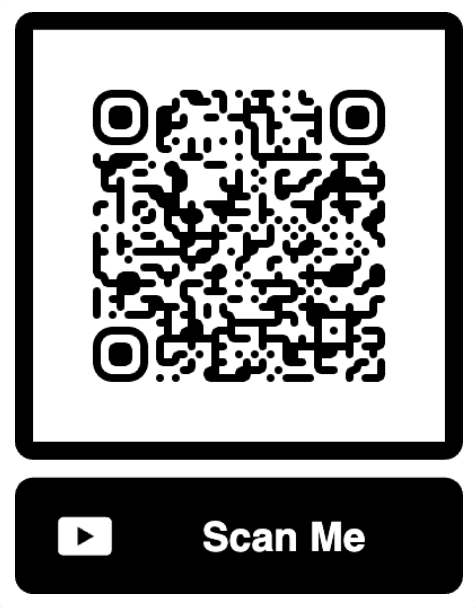
Made in QRCodeStack: logos, brand colors, and frame styles.
A QR code generator is an online tool that turns information — a website URL, a WiFi password, a PDF file, contact details, a payment link — into a scannable 2D barcode that any smartphone camera can read. Modern tools to generate QR codes do more than just encode data: they let you customize the design with brand colors and a logo, choose between static and dynamic codes, and track every scan in real time.
What makes QRCodeStack different?
QRCodeStack is built for businesses that print codes and need them to stay editable and trackable. Create dynamic QR codes with real scan analytics, brand short links on qstak.co or your own domain, and (soon) publish branded pages with a matching QR. Paid plans start at $9/mo after a 7-day trial — no watermark, no ad page on scan.
Custom QR codes with your logo, colors, and design
A plain black-and-white QR code does the job. A branded QR code gets significantly more scans. QRCodeStack lets you design QR codes that look like part of your brand, not a generic black square stuck in the corner of a flyer.
Drop your logo straight into the center of the code. Pick foreground and background colors from your brand palette, or use a gradient. Choose from rounded dots, dot patterns, classic squares, or custom eye styles for the three corner markers. Add a frame with a "Scan me" call-to-action or your own text. Every design choice is preserved when you export as high-resolution PNG for print or scalable SVG for digital use, and the QR code stays scannable because the generator uses error correction to compensate for the logo overlay.
If you want even more control, save your design as a reusable template and apply it to every new QR code you create. Brand consistency across 5, 50, or 5,000 QR codes — without rebuilding the design each time.
Which type of QR code should I use?
Different content needs different QR codes. A WiFi QR code carries network credentials so guests connect without typing a password. A vCard QR code drops your full contact details into someone's phone with one scan. A PDF QR code opens a document; a UPI QR code triggers a payment. QRCodeStack supports every major QR code type and each one is dynamic-ready, so you can edit and track them just like a standard link.
Where to put a QR code
Anywhere you print. Because the code is dynamic, the printed piece stays valid when the destination changes — no reprint, no dead link.

Menus
Change a price or a dish without reprinting the menu. The code on the table stays the same.

Flyers & posters
Point a whole print run somewhere new mid-campaign, and see which drop actually got scanned.

Packaging
Instructions, reorders, or a review prompt — updated long after the batch has shipped.

Vehicles & signage
The most expensive print to redo is the one you never have to. Re-point it from a laptop.

Yard & window signs
Point the board at whichever listing is live. One sign, every viewing, no reprint between them.

Badges & lanyards
Badges get printed weeks before the agenda settles. Move the destination, not the print run.

Exhibition banners
Send the stand somewhere new between shows, and see which hall actually scanned it.

Key cards & room signage
Wi-Fi, check-out, room service — changed at the front desk instead of at the printer.

Swing tags & shelf labels
Care instructions today, a restock link tomorrow. The tag on the rail never moves.

Counter & desk signs
Forms, directions, booking — updated without ordering a new stand for the counter.

Cartons & leaflets
Information that can still be corrected after the batch is boxed, labelled and shipped.

Donation boxes
Point the box at this season’s appeal, and count the scans the table actually earned.
Every code shown above is real and scannable.
How to create a QR code with QRCodeStack?
Creating a QR code on QRCodeStack takes less than 60 seconds and no technical skills.
Choose a QR code type
Pick from 37+ QR code types — website URL, WiFi, vCard, PDF, restaurant menu, UPI payment, Google Review, video, Instagram, WhatsApp, and more.
Add your content and customize
Enter your URL, upload your file, or fill in your details. Then drop in your logo, pick your brand colors, add a "Scan me" frame, and preview the result live as you design.
Download and track
Download your QR code as a high-resolution PNG for print or scalable SVG for digital use. If you chose a dynamic QR code, every scan is tracked in real time with location, device, and time data in your dashboard — full city-level detail is free during your 7-day trial and included on Business.
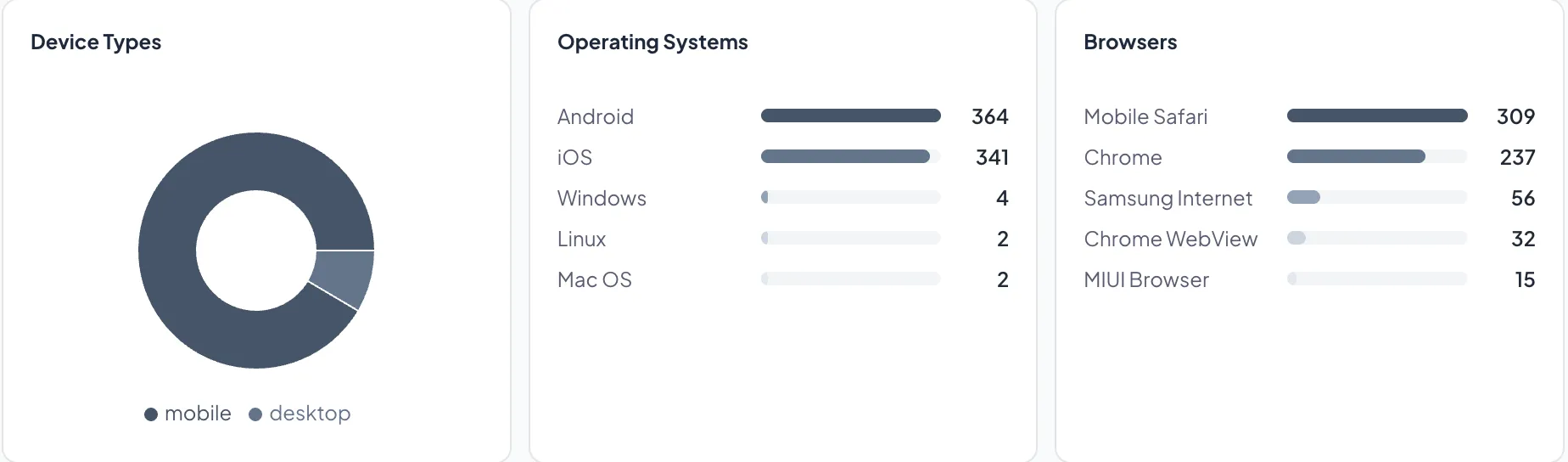
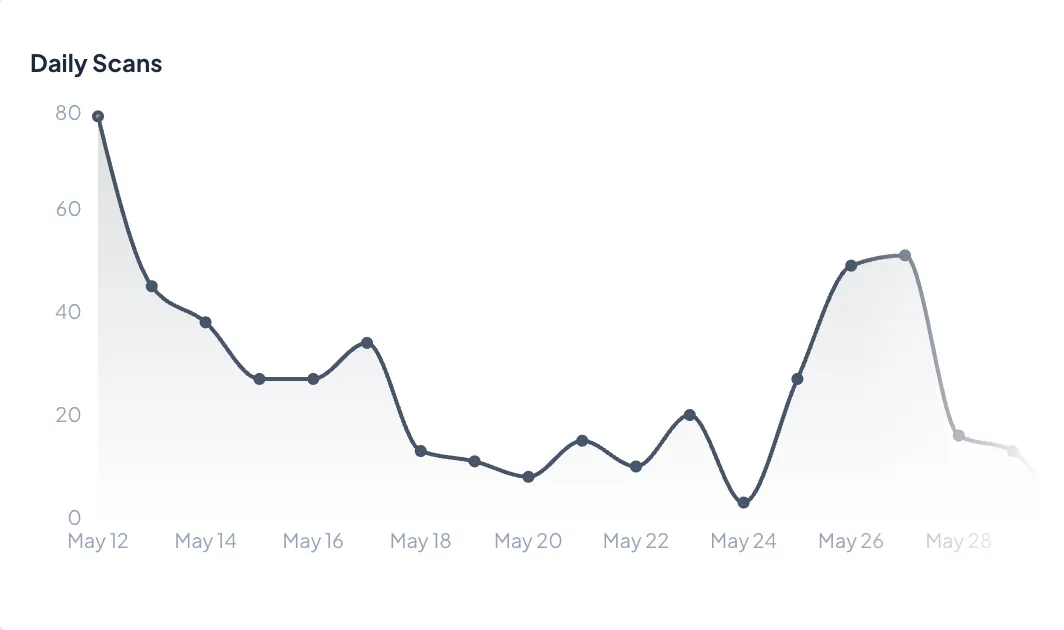
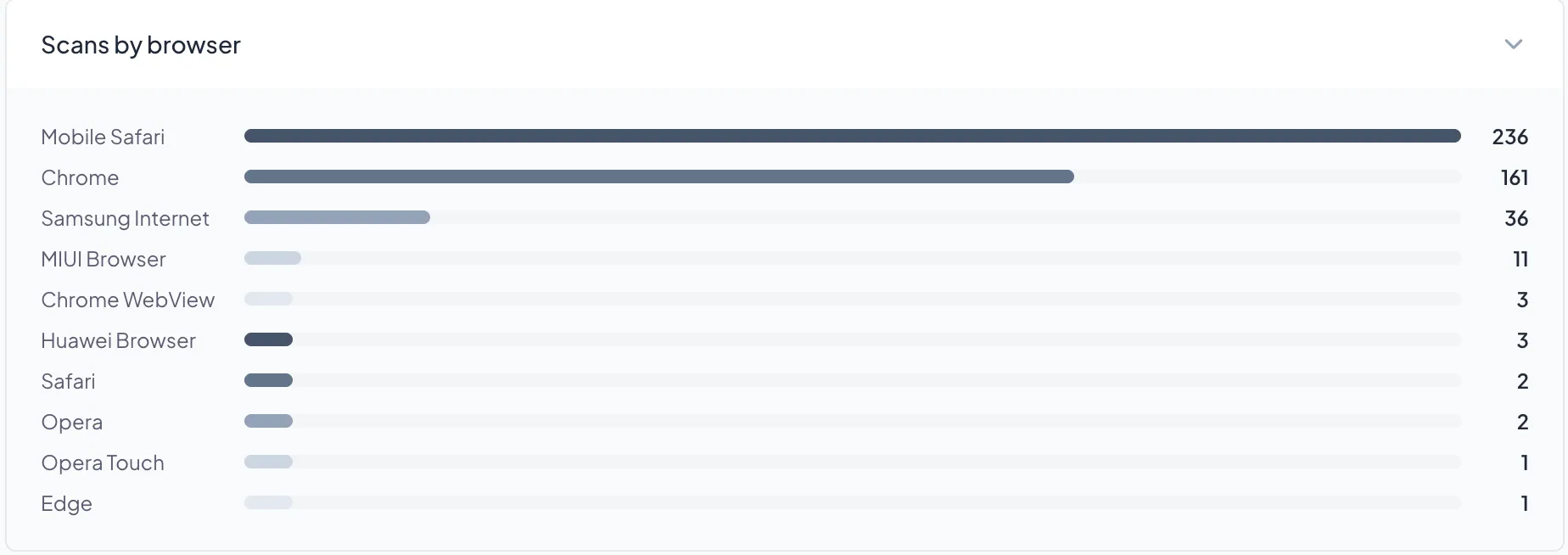
Live scan analytics from the QRCodeStack dashboard
Static vs dynamic QR codes: which one do you need?
Every QR code is either static or dynamic. The difference isn't about how they look — both can carry the same logo and colors — but about what happens after you create them.
Static QR codes
- • Encode the destination directly in the pattern
- • Permanent once created — pattern never expires
- • Cannot be edited after creation; no scan analytics
- • Unlimited static creates on paid plans (not on the free trial)
- • Work offline after download
- • Best for: fixed WiFi, plain text, URLs that will never change
Dynamic QR codes Recommended for business use
- • Point to a short URL you control — the printed code never changes, but the destination can
- • Edit the link or content anytime, no reprinting
- • Track every scan: device, browser, time; city-level location on trial and Business
- • Unlimited scans on every plan
- • Password protection, expiry dates, or scan limits (Pro+)
- • Best for: marketing, business cards, menus, packaging, events
Want a deeper dive? Read our complete guide to static vs dynamic QR codes.
Generate any type of QR code
QRCodeStack supports every major QR code type and each one is dynamic-ready, so you can edit and track them just like a standard link.
More than a generator: a QR code management platform
Generating the code is the easy part. Running a few hundred of them across stores, products and campaigns — and being able to report on the result — is the job this platform is built for.
QR code management software
Tags, bulk creation, roles and an org-wide audit log for estates too big for a spreadsheet.
QR code tracking software
Per-scan rows rather than a counter, kept for the life of the account and exportable to CSV, GA4 or the API.
Campaign management
Schedule activation and expiry, split traffic to A/B test creative, and report on the campaign rather than the code.
White label for agencies
Scan pages and short links on your own domains, with our branding removed. No reseller licence, no revenue share.
Every scan and click tells you something
QR scan analytics and link click analytics, in one dashboard
Someone scanned the poster at 7pm on a Tuesday, in Pune, on an iPhone. Someone else clicked the link in your newsletter and never came back. Most tools hand you a number and stop there.
A scan and a click are the same signal wearing different clothes — a person, a moment, a place, an intent. That is why scans and clicks land in one place here instead of two dashboards, and why we keep that history instead of expiring it after 30 days.
Start listening.
Built for individuals, SMBs, and large enterprises
Same product spine — dynamic QR, short links, analytics — sized from a solo creator on Starter to multi-brand teams on Business and Enterprise.

Individuals & freelancers
Business cards, portfolios, personal branding, and one-off campaigns. Editable codes so a reprint is never the only option; short links for bios and pitches.
Starter from $9/mo · 7-day free trial

SMBs & local brands
Menus, packaging, posters, Google reviews, multi-location print. Track what actually gets scanned, brand short links on your domain, and keep history past 30 days.
Starter & Pro · custom short-link domains on Pro

Enterprises & agencies
Volume codes, white-label scan pages, team seats, SAML/SCIM, workspaces, and API. Agencies run client campaigns; enterprises standardize print and digital routing.
Business & Enterprise · SSO & bulk
More than a QR code generator
Short links, QR codes and landing pages share one dashboard, one analytics pipeline, and one subscription — every channel tracked in the same place, whether you are one person or a global brand.
URL Shortener
Branded short links on your own domain, device & country routing rules, and click analytics kept forever.
Branded Pages
Link-in-bio and landing pages at your own URL — each with a matching QR code, no code required.
Analytics
Scans and clicks side by side — devices, locations, referrers and campaigns in one view.
QR codes for every scale of work
From a personal vCard to multi-location retail and agency client campaigns — each guide has examples, templates, and best practices.
Restaurants & cafes
Swap paper menus for a QR code on every table. Update prices and dishes in real time. Collect Google Reviews from happy diners with one extra scan.
Restaurant QR codes →Business cards
A vCard QR code on your card saves your full contact details to someone's phone in one tap — no typing, no business card stack on a desk.
vCard QR code →Marketing & advertising
Track which flyer, billboard, or magazine ad actually drives scans. Update the landing URL without reprinting.
Marketing QR codes →Real estate
A QR code on the "For Sale" sign opens the virtual tour, floor plan, and agent contact details. Track scans to see which listings get the most interest.
Real estate QR codes →Events & conferences
One QR code for the schedule, speaker bios, WiFi password, and feedback form. Update content live as the event runs.
Event QR codes →Product packaging
Link to the manual, how-to video, warranty form, or nutritional info. Update what the QR shows without changing the packaging.
Packaging QR codes →Healthcare
Patient intake forms, appointment reminders, prescription info, and clinic WiFi — all behind a single trackable QR code.
Healthcare QR codes →Retail & loyalty
At-shelf product info, loyalty enrolment, and Google Review collection.
Loyalty QR codes →Dynamic QR codes & short links vs the alternatives
If you’re comparing dynamic QR platforms and link tools, here’s how QRCodeStack stacks up against QR Tiger, Uniqode, Bitly, Flowcode, and QRCodeChimp. Pricing and features below are from each platform’s public pages, last verified in early 2026.
| Feature | QRCodeStack | QR TIGER | Uniqode | QRCodeChimp | Bitly | Flowcode |
|---|---|---|---|---|---|---|
| Starting Price | $9/mo | $7/mo | $9/mo | $7/mo | $10/mo | $9/mo |
| Branded Short Links | 1,000 on Pro | — | — | — | 500 on Growth | — |
| Custom Link Domain | 1 on Pro, 5 on Business | — | — | — | Growth+ ($29+) | — |
| Link Click Analytics | Included, kept | — | — | — | 30 days on Core | — |
| QR Code Types | 37+ | 23 | 15 | 40+ | ~8 | ~10 |
| Unlimited Plan | $59/mo | $89/mo | $99/mo | $35/mo | $199/mo | $250/mo |
| Unlimited Scans | Yes (all plans) | Paid only | Plan limits | Yes | Yes | Paid only |
| Logo & Colors | Yes | Yes | Yes | Yes | Yes | Yes |
| Dot Patterns & Eye Styles | Yes | Yes | Yes | Yes | Limited | Yes |
| Frame Templates | 24 styles | Yes | Yes | 200+ | Yes | Yes |
| Scan Analytics | Yes | Yes | Yes | Yes | Yes | Yes |
| Bulk QR Creation | Yes (Pro+) | Yes | Yes | Yes | Enterprise | Yes |
| Password Protection | Yes (Pro+) | Yes | Yes | Yes | No | No |
Data based on publicly available pricing and feature pages as of March 2026.
For deeper one-on-one comparisons, see our guides: QR Tiger alternatives, Bitly alternatives, Linktree alternatives, Rebrandly alternatives, Flowcode alternatives, Uniqode alternatives, and QRCodeChimp alternatives.
A QR code generator you can actually trust
The QR code space is full of dark patterns — inflated scan counts, fake “your code was scanned!” emails, free codes that quietly expire, and pricing you can only see after a sales call. QRCodeStack is run by a registered business and does none of that. Here's what you get instead.
Real scan data — no fake alerts
Every number in your dashboard is a genuine scan from a real device. We never inflate counts and never send fake “your QR code was just scanned!” emails to pressure you into upgrading — a tactic some QR generators rely on.
Transparent pricing, no “contact sales”
Exact prices, public and upfront: $9, $19, and $59/month. A 7-day free trial needs no credit card. No hidden enterprise tiers, no region-based price games.
No ads, no watermarks, no hostage codes
Scanners never see ads or third-party branding we injected — on any plan. Static codes never expire, and we don't silently deactivate a code you've already printed to force an upgrade.
A registered, accountable business
QRCodeStack is operated by Superstore Seven Technology Solutions LLP — a GST-registered company with a real registered office and 24×7 support, not an anonymous QR site you can't reach when something breaks.
We'd rather win on features than pressure: 37+ QR types, built-in Meta, Google, and TikTok retargeting pixels, per-scan analytics down to city and device, device-based app-store routing, SSO/SAML/SCIM, and a built-in restaurant menu — all at honest, published prices.
Enterprise-ready security and team management
QRCodeStack scales from Starter at $9/month to company-wide deployments. Bring your identity provider, provision users automatically, control who can edit what with roles, and keep a full audit trail — the access controls IT teams expect, without an opaque “contact sales” paywall.
SSO & SAML 2.0
Sign in with Google Workspace out of the box. On Business, bring your own IdP — Okta, Microsoft Entra ID, OneLogin — via SAML 2.0, with optional enforce-SSO that blocks password logins for your domain.
Teams with role-based access
Invite teammates as admin, editor, or viewer. Editors manage QR codes, viewers get read-only analytics, admins control membership — and SCIM 2.0 provisioning syncs users straight from your directory.
Two-factor authentication
TOTP 2FA with Google Authenticator, 1Password, Authy, or any RFC 6238 app, plus single-use backup codes — included on every plan, not just the expensive ones.
Audit logs
Every membership change, invite, role change, and security event is recorded in an org-wide audit trail. Review it in the dashboard or export to CSV for compliance reviews.
Workspaces for agencies & brands
One organization, many workspaces: agencies separate 30 client brands, chains separate locations. Workspace roles can differ from org roles, so a brand manager edits only their brand.
Hardened API access
REST API keys with per-key scopes and IP allowlists, so your integration can read analytics without being able to delete codes — and only from the servers you approve.
Need custom limits, a DPA, or procurement support? Talk to us about Enterprise · GDPR data-export and deletion built in.
Frequently Asked Questions
Everything you need to know about QRCodeStack
What is a QR code generator?
A QR code generator is an online tool that turns information — like a website URL, WiFi password, PDF file, or contact details — into a scannable 2D barcode that any smartphone camera can read. QRCodeStack supports 37+ types of QR codes, lets you customize them with your logo and brand colors, and tracks every scan with real-time analytics.
Does QRCodeStack include a URL shortener?
Yes. Every plan includes a URL shortener alongside QR codes — create short links on qstak.co (custom domains from Pro at $19/mo), route visitors by device or country, tag campaigns with the UTM builder, and track every click with analytics kept forever. Starter starts at $9/month with 100 active links.
Can I create a link-in-bio page?
Yes. Branded Pages lets you build link-in-bio and landing pages with no code, publish each at /p/your-slug, and get a matching QR code — page views share the same analytics as your QR scans and short-link clicks. Paid plans can publish; Pro+ removes QRCodeStack branding. You can also create a multi-link QR type, or shorten and brand links with the URL shortener.
Is there a free trial?
Yes. Every new account gets a 7-day free trial with no credit card — up to 5 dynamic QR codes, 25 short links, and analytics (including city-level location during the trial). Static codes are not included on the trial. After the trial, plans start at $9/month. Publishing a branded page at /p/… requires a paid plan.
How do I make a QR code?
Open the generator at the top of this page, pick the type of QR code you want (URL, WiFi, vCard, PDF, etc.), enter your content, customize the colors and logo if you'd like, and download the result as a PNG or SVG file. No technical skills needed — most users create their first QR code in under 30 seconds.
Do QR codes expire?
A static QR pattern never expires once created — the data is encoded in the image. Dynamic QR codes stay active as long as your QRCodeStack subscription is active. Creating static codes requires a paid plan (trial includes dynamic only, not static). We do not put ads on scans or silently kill live dynamic codes to force upgrades.
Are QR code generators safe to use?
QRCodeStack is GDPR and CCPA compliant, served over SSL, and never displays ads on your QR codes or scan pages. We never share or sell scan data. The QR codes themselves are safe by design — they're just an encoded link — but scanning unknown QR codes from untrusted sources can lead to phishing sites (a practice called "quishing"). The safest practice is to use a trusted generator for your own codes and check the destination URL before tapping unknown ones.
Can QR codes be tracked?
Dynamic QR codes can be tracked: every plan records device type, browser, OS, and timestamp. Country/region counts are available broadly; full city-level location and the scan map are included during the free trial and on Business. Password protection, expiry dates, and scan caps are Pro+. Static QR codes cannot be tracked because the data is encoded directly without going through a server.
Can I add my logo to a QR code?
Yes. Every QR code created on QRCodeStack supports a custom logo in the center, plus custom foreground and background colors, dot patterns, and corner styles. The logo placement uses QR code error correction so the code stays scannable even with the logo covering up to 30% of the pattern.
What's the difference between dynamic & static QR codes?
Static QR codes encode the destination directly into the pattern — permanent once created, offline-capable, but not editable or trackable. Dynamic QR codes route through a short URL you control, so you can edit the destination after printing and track every scan. QRCodeStack is a dynamic-first product (with short links and pages); unlimited static creates are included on paid plans for fixed destinations. Read the full guide.
How much does a QR code cost per month?
Dynamic QR codes start at $9/month (Starter: 10 dynamic), $19/month (Pro: 50), and $59/month (Business: 600), after a 7-day free trial with 5 dynamic codes and no credit card. Paid plans include unlimited static creates and short links.
What is the most trusted QR code generator?
Trust depends on what you measure: security compliance, data privacy, pricing transparency, and longevity. QRCodeStack is GDPR and CCPA compliant, served by SuperStore Seven Technology Solutions LLP since 2024, and rated highly on Trustpilot. We keep dynamic codes live for the life of your subscription, never silently kill printed codes to force an upgrade, and never put ads on your scan pages.
Do I need an account to create a QR code?
Yes for dynamic (editable + trackable) codes — sign up for a 7-day free trial with no credit card, then keep codes on a paid plan. Static creates are included on paid plans for destinations that will never change. There is no separate free static product page; QRCodeStack is built around dynamic QR codes, short links, and (soon) branded pages.
Can I edit a QR code after I've printed it?
Yes, if it's a dynamic QR code. The printed pattern stays the same forever, but you can change where it points — a new URL, a different PDF, updated contact details — from your dashboard at any time. Static QR codes cannot be edited because the data is locked into the pattern; if you need to change a static code, you'll have to generate a new one.
Does QRCodeStack support retargeting pixels like Meta, Google, or TikTok?
Yes — retargeting is built in. Every dynamic QR code can fire a Meta (Facebook) pixel, Google Ads conversion tracking via Google Tag Manager, and a TikTok pixel on the scan redirect, alongside native Google Analytics 4 tracking. Everyone who scans your printed flyer, packaging, or poster can be added to your ad-platform custom audiences and retargeted later — turning offline impressions into online ad audiences. Pixels are configured per code or saved as reusable tracking profiles, with automatic UTM parameters for attribution. Retargeting is included on the Pro plan ($19/month) — QRCodeStack is the only QR platform at this price with native TikTok pixel support.
Does QRCodeStack support device-based routing (smart routing)?
Yes. The App Download QR code detects the scanner's device automatically and routes iPhone and iPad users to the Apple App Store, Android users to Google Play, and Huawei users to AppGallery — one printed code, three destinations. You can change any dynamic code's destination after printing. Activation/expiry dates, scan caps, and password protection are available on Pro+.
How detailed are QRCodeStack's scan analytics?
Every plan records device, browser, OS, and time of day in a live dashboard. City-level location and the scan map are included during the 7-day free trial and on Business. Weekly email reports, data export, UTM tracking, and native Google Analytics 4 are available from Starter ($9/month). Meta, Google Ads (GTM), and TikTok retargeting pixels are on Pro ($19/month).
Print once. Edit anytime. Track every scan.
Dynamic QR codes, branded short links, and pages — one dashboard for individuals, SMBs, agencies, and enterprises that print and measure.